One photo · Seven ready-made dances
AI Dance
Video Generator
Turn one photo of you or your pet into a 10-second AI dance video. Choose one of seven ready-made effects and download a vertical MP4 in minutes.
Upload a photo ↓- No prompt no app or editing, it runs in your browser
- No subscription pay once from $9.90
- No watermark 9:16 720p MP4 with music, for TikTok, Reels and Shorts
- AI-generated clearly labeled
 Photo
Video
Real results
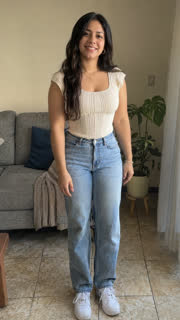
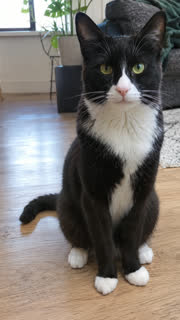
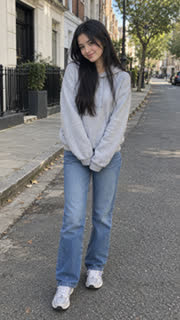
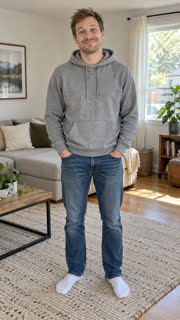
Actual output of these templates, each from the single photo in its corner. Source photos: AI-generated people and AI-generated photos of a husky and a cat.
 The photo
 The photo
 The photo
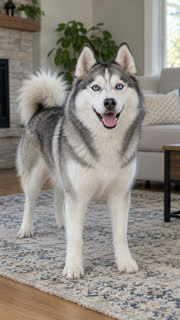 The photo
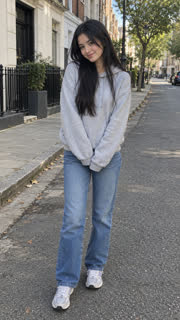 The photo
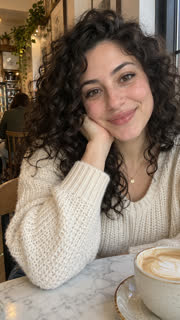 The photo
What is an AI dance video?
An AI dance video is a generated clip that animates a still photo of a person or pet into a dance scene. On AI Dance Trend, upload one photo, choose one of seven ready-made effects and get a 10-second vertical MP4 with original music. No filming, prompts or app installation are needed.
Try the Dime Dime Baby AI, or explore the Raindance AI Trend. The seven listed effects each have a tested sample and their own scenes and moves. They generate new clips from one subject in one photo; the tool does not currently copy an uploaded reference dance, handle two dancers or use commercial songs.
AI dance video effects
Seven ready-made dances, each with a real example made from a source photo.
Dime Dime Baby AI
The quinceañera strut: you cross the dance floor toward the camera, bite a pink concha, chew with a dead stare into the lens, then dance back into the party.
See the dance → FeaturedSuave Cat Dance AI
Your cat leads the viral three-kitten dance in your own room: a black studded belt, two backup kittens, paws-out sways and the turn-around hip shake.
See the dance → FeaturediPhone Kupi Dance AI
Step into the viral phone-dance format: a nighttime hotel room, a foldable-phone reveal, then the bouncy side-step routine from your own photo.
See the dance → FeaturedRumpelstiltskin Tiptoe Dance
Become the creepy little imp from the viral clip: velvet tailcoat, straw-filled barn and that sneaky high-knee tiptoe.
See the dance → EvergreenAI Pet Dance
Your dog or cat stands up in your living room, in a tiny sparkly outfit, and does the sassy diva dance everyone's pet is doing on TikTok.
See the dance → EvergreenAI K-pop Idol Stage
Debut as a K-pop idol: a music-show stage, a sharp point dance, a wink, and the ending-fairy close-up.
See the dance → Still trendingRaindance AI Trend
Your everyday photo, then a hard cut to you on a golden-hour pier, singing softly into the camera. The music-video moment everyone is posting.
See the dance →How to make an AI dance video
- 1
Upload one photo
A sharp, full-body photo, standing, good light. One person or one pet. JPG, PNG or WebP.
- 2
Pick the dance
Choose the trend. Each one has its own moves, scene and music style, tuned so the AI keeps your face.
- 3
Pay once
Secure checkout with card, Apple Pay or Google Pay. No account, no subscription.
- 4
Download & post
Your 10-second vertical MP4 is ready in a few minutes. Add the trending sound in TikTok or CapCut and post.
Complete guide: make an AI dance video from a photo, troubleshoot results and compare workflows
Photo tips that make the dance look real
- Full body in frame, feet visible. Cropped legs make the AI invent them.
- Face the camera, arms relaxed at your sides.
- Plain background beats a busy one.
- For pets: shoot at their eye level, whole body visible.
Pricing
Pay once. Prices in USD. If a video fails, the credit comes back automatically, a clearly broken one gets its cost back, and an order you haven't used is refunded in full within 7 days.
Single
$9.90
1 dance video · $9.90 each
- Any dance, any photo
- Vertical 720p MP4, no watermark
- Original music track
- Ready in a few minutes
Trio
$19.90
3 dance videos · $6.63 each
- Any dance, any photo
- Vertical 720p MP4, no watermark
- Original music track
- Mix dances and photos
Party
$29.90
5 dance videos · $5.98 each
- Any dance, any photo
- Vertical 720p MP4, no watermark
- Original music track
- Mix dances and photos
AI dance video FAQ
What is an AI dance video?
It is a short video generated from a still photo so the person or pet appears to dance. Here you can choose from seven tested photo-to-dance scenes; each produces a 10-second vertical MP4 with original music. This is a fixed-effect generator, with no custom choreography upload.
How do I make an AI dance video from a photo?
Upload a clear photo of one consenting adult or your pet, select one of seven dance effects and pay once. We generate a 10-second video in a few minutes. Download the MP4 and add any sound you have permission to use when you post.
How do I do the AI dance trend on TikTok?
Pick the dance the trend uses here (each effect page names the trend it copies), upload one full-body photo, pay once and download the 10-second vertical MP4. In TikTok, upload it, tap Add sound and search the trend's song so the beat lines up, then turn on the AI-generated label before you post.
What is the AI that makes you dance?
Most AI dance trends are made with image-to-video models that animate a still photo, not with a filter. This site uses ByteDance Seedance 2.0 with a fixed, tested prompt for each dance, so you only choose the dance and the photo. General tools such as Viggle or Kling copy a reference video's moves instead, which takes more setup.
Is it free?
No. There is no free trial: each video costs real GPU time. You pay once per pack, from $9.90 for one video. There is no subscription and nothing renews, there's no watermark, and a failed video gives its credit back.
Is it a face swap?
No. We don't paste your face onto someone else's video: you (or your pet), from your own photo, star in a new scene. Raindance, Pet Dance and Suave Cat Dance open on your actual photo, then cut to the pier, to your pet in a diva outfit or to your cat leading two backup kittens; Tiptoe Dance and K-pop Idol Stage put you in the costume of the trend; iPhone Kupi Dance and Dime Dime Baby keep your clothes and build a new scene around you, a nighttime hotel room or a banquet-hall party. Either way, only upload photos of yourself, your pet or someone who agreed.
Can I make it on my iPhone?
Yes. It runs in Safari or Chrome on your phone, no app to install. When the video is ready, tap Save to Photos on your order page, then post it from TikTok, Instagram or YouTube.
How long does a video take?
Usually 2 to 5 minutes. Keep the order page open or bookmark it; the video appears there as soon as it's ready.
Does the video include the trending song?
No. We never use original songs or original clips. Your video gets an original instrumental, and you can add the trending sound when you post.
Can I use a photo of my dog or cat?
Yes. Pets are some of the best AI dance videos. Pick Pet Dance, Suave Cat Dance (cats), Tiptoe Dance or Raindance and upload a clear photo.
Whose photos can I upload?
Your own, your pet's, or someone who agreed to it. No photos of minors, no public figures, no nudity. We delete uploaded photos within 30 days, or after 2 days if you don't buy.
Will the video keep my face and outfit?
Your face (or your pet's face and markings) carries through every dance. Raindance, iPhone Kupi Dance and Dime Dime Baby keep your clothes. Tiptoe Dance, K-pop Idol Stage, Pet Dance and Suave Cat Dance swap the clothes for the trend's costume (the imp's tailcoat, a stage outfit, a tiny diva outfit, a studded belt), because the costume is part of the joke. A sharp, front-facing, well-lit photo keeps your face closest.
Can I delete my photo and video?
Yes. On your order page, tap Delete my photo and videos and both are removed right away. Otherwise photos are deleted automatically within 30 days.
What if the video doesn't come out right?
If a video fails, the credit goes straight back to your order. If it came out clearly broken, email us within 7 days and we'll give back what it cost.
Which AI model makes the video?
ByteDance Seedance 2.0, an image-to-video model, accessed through an API provider (APIMart, SeeAPI or Kie.ai). Each dance is a fixed template we wrote and tested, so you don't need to write prompts.
Is the video AI-generated?
Yes. Every video is generated by AI from your photo, and we say so on every page. When you post it, use the platform's AI-generated label (TikTok asks for it on realistic AI videos).
How is this different from Viggle, Kling or CapCut templates?
Those are general tools you learn and configure. Here you pick a ready-made trend, upload a photo and get a vertical video sized for TikTok. No app, no account, no watermark.
Guides for making an AI dance video
- Can ChatGPT make an AI dance video from my photo?
- Which AI dance effect should I choose for my photo?
- How do I make an AI dance video from one photo?
- Can I make an AI dance video on my phone without an app?
- How do I make an AI dance video for Instagram Reels?
- How do I make an AI dance video for TikTok from a photo?
- How can I make my cat dance with AI from one photo?
More dance trends from one photo
These dances aren't on AI Dance Trend. Our sister site Turnly makes them from one photo.