How do I make an AI dance video for TikTok from a photo?
Updated
Create a short TikTok dance clip from one clear photo of yourself, a consenting adult, or your own pet. Choose one of seven fixed effects, pay once from $9.90, and download a vertical 720p MP4 with original music and no watermark. This generator does not copy a TikTok link or include a trending song.
See a real generated video before uploading
This is an actual K-pop Idol Stage result made from its source photo, not a simulated preview. Choose the effect that matches this example.
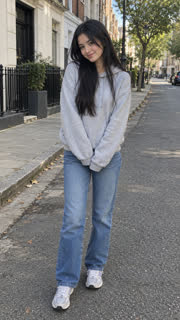
Choose an AI dance effect for your TikTok
- K-pop Idol Stage: an adult performer in a fictional stage scene with a point-dance moment. This page's generator starts with that effect.
- Tiptoe Dance: a person or pet performs exaggerated high-knee steps in a fairy-tale scene with a costume change.
- Pet Dance: a dog or cat is animated into a short dance routine. The Pet Dance page has a real husky and a real grey tabby cat sample, but no sample proves how every pet will look.
- Raindance: the video starts with your photo, then moves to a newly generated sunset-pier scene.
- iPhone Kupi Dance: an adult keeps the source-photo outfit while the generator creates a nighttime hotel room, foldable-phone reveal and bouncy side-step routine.
Make the video and post it to TikTok
- Choose a well-lit photo of one adult who has agreed to be shown, or a photo of your own pet. Keep the face and most of the body visible; do not upload minors or public figures.
- Watch the actual example above, select the effect you want, upload your photo and choose a one-, three- or five-video pack. Payment is one-time, starting at $9.90.
- Open the private order page when generation finishes and download the vertical 10-second 720p MP4. It has original music and no watermark; the file does not contain a trending TikTok song.
- In TikTok, start a post and upload the MP4. Preview the crop, write a caption that does not misrepresent the AI scene as real footage, disclose AI use when required, and add only a sound you are allowed to use.
How to label an AI dance video on TikTok
TikTok's guidance says creators should label content that is fully generated or significantly edited by AI. It gives an example of a real image or video being changed so the subject does something they did not do, such as dancing. Because this tool animates a still photo into a new dance, use the platform's AI-generated content disclosure when applicable.
For an uploaded video, TikTok's published steps are: tap Add post, upload or record the video, tap Next, open More options, then switch on the AI-generated content setting. The wording or location can change as the app is updated. TikTok says the label alone does not reduce distribution when the post follows its rules.
Music rights and limits to know before posting
The generated file uses original music and does not reuse a viral song, TikTok clip or uploaded dance reference. If you want a particular sound, add it in TikTok only where its terms and the sound's availability permit your use.
TikTok recommends its Commercial Music Library for content that promotes a brand, product or service. Its music licenses outside that library may not cover commercial use. This generator also cannot follow a dance from a TikTok link, choose arbitrary choreography, sync the render to a named song, or animate two people together.
Frequently asked questions
- Can this copy a trending TikTok dance from a link?
- No. This product uses seven prepared dance effects. It cannot import a TikTok URL or reference video, transfer arbitrary choreography, or create a two-person dance.
- Should I label the video as AI-generated on TikTok?
- TikTok asks creators to label fully generated or significantly AI-edited content. Its guidance specifically includes a person shown doing something they did not do, such as dancing. Use TikTok's AI-generated content setting when posting this generated clip.
- Can I add a trending TikTok sound?
- The downloaded MP4 includes original music, not a trending commercial recording. You can add a sound in TikTok when you have permission to use it. For posts promoting a brand, product or service, TikTok recommends its Commercial Music Library because other music licenses may not cover commercial use.
- Whose photo can I upload?
- Use a photo of yourself, your own pet, or an adult who gave permission. This product does not accept photos of minors or public figures, and each video is made from one subject photo.
Related questions
- All available AI dances
- Can ChatGPT make an AI dance video from my photo?
- Which AI dance effect should I choose for my photo?
- How do I make an AI dance video from one photo?
- Can I make an AI dance video on my phone without an app?
- How do I make an AI dance video for Instagram Reels?
- How can I make my cat dance with AI from one photo?