Can I make an AI dance video on my phone without an app?
Updated
Yes. Open AI Dance Trend in Safari on iPhone or Chrome on Android, choose a supported dance and upload one eligible photo from your phone. After a one-time purchase from $9.90, your private order page provides a 10-second vertical 720p MP4 to download. No separate app, filmed dance or editing software is required.
See a real generated video before uploading
This is an actual Pet Dance result made from its source photo, not a simulated preview. Choose the effect that matches this example.
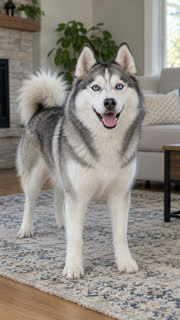
Step-by-step: from your phone's photo library to a dance
- Open this page in Safari on iPhone or Chrome on Android. Use a clear photo of yourself, your pet, or an adult who explicitly agreed. Do not use photos of minors or public figures.
- Tap the photo upload control above. Choose an existing image from your library or Files, or take a new picture if your browser offers that option. JPG, PNG and WebP are supported.
- Choose Pet Dance for an upright pet routine, Tiptoe Dance for a playful fairy-tale scene, Raindance for a sunset-pier scene, K-pop Idol Stage for an adult stage performance, or iPhone Kupi Dance for an adult hotel-room phone reveal. The generator here starts with Pet Dance selected.
- Choose a video pack and complete the one-time checkout. Single-video pricing starts at $9.90; you can return to the private order link while your video is being made.
- Open the completed video on your order page, use the browser's download or share action to save the MP4, and post it to TikTok, Reels or Shorts when ready.
Tips for iPhone Safari and Android Chrome
- If the upload opens a file browser, switch to Photos or the relevant picture folder. Cloud-only pictures may need to finish downloading to your phone first.
- If the downloaded video does not appear in your photo gallery, check your browser downloads or Files app. The exact Save Video option depends on your browser and phone settings.
- Keep your private order URL so you can reopen the finished video after changing tabs. Do not share that private link publicly.
- You do not need to install an AI dance app. For music or captions not included in the generated video, use the posting platform's own editing tools and permitted sound library.
Which mobile photos work best?
Choose one well-lit, unobstructed person or pet, ideally with the whole body and feet or paws visible. A clear front-facing image is easier for the generator to follow than a cropped group shot or a filtered selfie.
A 10-second animation can change a face, costume, background or limbs imperfectly. Preview our actual examples before purchasing; each effect deliberately changes some scene details.
What this mobile generator can and cannot do
The site provides seven prepared single-subject dance effects, original music, a vertical MP4 and a one-time video purchase. It does not make two friends dance together, copy steps from an uploaded dance reference, or attach your own commercial recording.
Your picture is deleted automatically within 30 days, sooner when unpaid. Buyers may delete uploaded material and results from their private order page.
Frequently asked questions
- Do I need to install an app to make an AI dance video?
- No. You can upload a photo, choose a dance and buy a video in your mobile browser, including Safari on iPhone and Chrome on Android.
- Can I make it without filming myself dancing?
- Yes. This tool animates one permitted photo into a prepared 10-second dance scene. You do not need a recording or dance skills.
- Does the MP4 include the original viral song?
- No. The generated MP4 includes original music. Add a licensed or platform-permitted sound in the posting app if you need a particular song.
- How do I save it on my phone?
- Use the download or share controls on your private order page. If it does not appear in Photos or Gallery, check your browser downloads or Files app.
Related questions
- All available AI dances
- Can ChatGPT make an AI dance video from my photo?
- Which AI dance effect should I choose for my photo?
- How do I make an AI dance video from one photo?
- How do I make an AI dance video for Instagram Reels?
- How do I make an AI dance video for TikTok from a photo?
- How can I make my cat dance with AI from one photo?