How do I make an AI dance video from one photo?
Updated
To make an AI dance video from a photo, pick a sharp, well-lit picture of one adult or pet, choose a ready-made dance scene, and generate the moving clip. On AI Dance Trend you can select from seven tested effects, pay once from $9.90, and download a 10-second vertical 720p MP4 with original music. You do not need to dance on camera or upload a reference video.
See a real generated video before uploading
This is an actual Tiptoe Dance result made from its source photo, not a simulated preview. Choose the effect that matches this example.
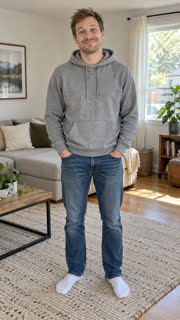
Step 1: choose a photo the AI can follow
Use your own photo, a photo of your pet, or one of an adult who explicitly agreed. Photos of children and public figures are not permitted. A single, well-lit person or pet works better than a group, a distant silhouette or a face covered by hair.
Keep the head sharp and the outline of the subject visible. For whole-body dances, include the feet. For pets, shoot at eye level and keep the paws in frame. JPG, PNG and WebP photos are supported. Uploading a new photo does not require learning prompts or making a reference video.
Step 2: choose the dance that matches your photo
Pick Pet Dance for a dog or cat performing a small sassy routine in its room, or Suave Cat Dance to make your cat the lead of the viral three-kitten dance. Tiptoe Dance puts a person or pet in a storybook barn with high-knee steps. Raindance turns a photo into a sunset-pier music-video moment. K-pop Idol Stage puts an adult on a fictional performance stage. iPhone Kupi Dance puts an adult into the viral hotel-room phone-reveal format, and Dime Dime Baby into the viral quinceañera party strut with a bite of a concha. Each one has a real generated sample that you can watch before purchase.
These are seven prepared effects, not an open-ended choreography editor. At present you cannot upload a clip and have this tool copy its exact footwork; two-person dances and importing your own song are also unavailable. Other AI motion-transfer platforms can support reference clips if that is your goal.
- Compare the seven photo-to-dance effects
- Pet Dance: make your dog or cat dance
- Suave Cat Dance: your cat leads three dancing kittens
- Tiptoe Dance: playful storybook steps
- Raindance: sunset-pier video
- K-pop Idol Stage: stage-performance dance
- iPhone Kupi Dance: hotel-room phone reveal and dance
- Dime Dime Baby: the quinceañera strut and concha bite
Step 3: generate, preview and download
- Upload your eligible photo with the form above, then check that the correct dance radio button is selected.
- Choose a one-, three- or five-video pack. One video costs $9.90. The checkout is a one-time purchase, with no subscription.
- After payment, keep your private order link. The video normally appears in a few minutes as a 10-second vertical 720p MP4 with original instrumental music and no watermark.
- Preview the result and download it. For TikTok, Reels or Shorts, add a platform sound only where you have permission to use it and follow the platform's AI-generated-content labeling rules.
Why did my AI dance video look wrong?
- Face changes between frames: choose a clearer front-facing photo with even lighting and no filter covering the face. AI similarity is not guaranteed.
- Legs or paws look distorted: use a photo that shows the entire body, ideally with room around feet and arms. Do not start with cropped or obscured limbs.
- I wanted the original outfit: the costume is part of Pet Dance, Tiptoe and K-pop. Raindance, iPhone Kupi and Dime Dime Baby keep the original clothes, although each creates a new setting after or around the source photo. Review each sample first.
- I need my own dance steps or more than one dancer: this site currently offers seven single-subject effects. Choose a motion-reference tool instead of buying the wrong product.
- Upload is rejected: try a clear standard JPG, PNG or WebP and check that the subject is visible, the image is not very small, and it is not extremely wide or tall.
Ready-made templates versus motion transfer
A template-based AI dance video generator is useful when you want a specific finished scene quickly without editing. A motion-transfer generator is a better fit when you have an exact dance routine you own the rights to use and need to reproduce its movements. These tools solve related but different problems.
For example, Pose AI describes a workflow where you can describe a dance or use a motion reference. AI Dance Trend instead provides seven defined scenes with tested examples and simple pay-per-video pricing. Compare output constraints, consent requirements and the actual price before choosing.
What happens to my photo?
Only submit photos you are permitted to use. Uploaded photos are automatically deleted within 30 days, sooner if you do not buy. Buyers can delete their photos and videos on the order page. A failed generation returns its corresponding video credit, and a clearly broken video gets its cost back, as the refund policy says.
Related questions
- All available AI dances
- Can ChatGPT make an AI dance video from my photo?
- Which AI dance effect should I choose for my photo?
- Can I make an AI dance video on my phone without an app?
- How do I make an AI dance video for Instagram Reels?
- How do I make an AI dance video for TikTok from a photo?
- How can I make my cat dance with AI from one photo?