How to make the Dime Dime Baby AI video from one photo
Updated · AI Dance Trend
Upload one clear full-body photo on the Dime Dime Baby page, pay once ($9.90 for one video) and a few minutes later download a 10-second vertical MP4: you cross a banquet-hall dance floor toward the camera, bite a pink concha, chew it with a blank stare into the lens and dance back into the party. Then add “BbY WOW” in TikTok when you post.
Make the Dime Dime Baby video from your photo
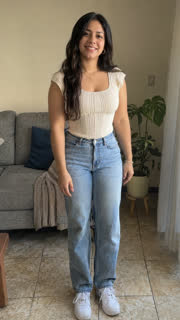
Step by step
- Pick a sharp photo of yourself (or of an adult who said yes), standing, whole body in frame, face well lit.
- Open the Dime Dime Baby page and upload it.
- Pay once: $9.90 for one video, $19.90 for three or $29.90 for five. No subscription and nothing to install.
- Wait 2 to 5 minutes and download the MP4 from your private order page.
- In TikTok, open a Dime Dime Baby video, tap its sound, choose “Use this sound”, add your video and the AI-generated label, and post.
What the video looks like, second by second
- 0 to 3 s: you walk slowly across the dance floor toward the camera, with attitude and a pink concha in your hand.
- 3 to 5 s: you take a big bite.
- 5 to 7.5 s: right in front of the camera, you chew with a straight face, staring into the lens.
- 7.5 to 10 s: you turn and dance back into the party.
- Vertical 720p, no watermark, with an original reggaeton-style beat (not the song).
CapCut template or a video made from your photo
The TikTok tutorials show how to use an AI template inside CapCut. Here there's nothing to install: you upload the photo in your browser, pay once and get a new clip made from your photo, with your face, hair and clothes. It doesn't use the original clip or the face of the man in it.