What photo works best for the iPhone Kupi Dance AI video?
Updated · AI Dance Trend
Use a sharp, well-lit photo of one adult facing the camera, with the face unobstructed and at least the upper body visible. A full-body photo is even better because the routine includes side steps and hip movement.
Make the iPhone Kupi Dance video from your photo
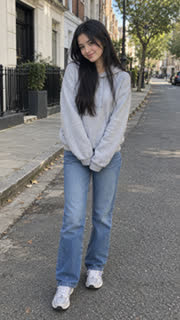
Best choices
- One person only, facing the camera.
- Face clear and evenly lit, without sunglasses or a mask.
- Upper body or full body visible instead of a tight face crop.
- Hands visible if possible, because the generated scene includes a phone prop.
- The original photo rather than a compressed screenshot.
Avoid
- Group photos or another person partly in frame.
- A face hidden by a phone, hat brim, hair or heavy shadow.
- Extreme side profiles.
- Photos of children or public figures.
Why the phone may vary
The phone is generated as part of the new scene, so its hinge, thickness and screen shape can vary between runs. The template deliberately asks for a generic foldable smartphone and no logos or branded interface.